 tadrik
For WooCommerce / stock
What to reorder and what isn't selling, in one email.
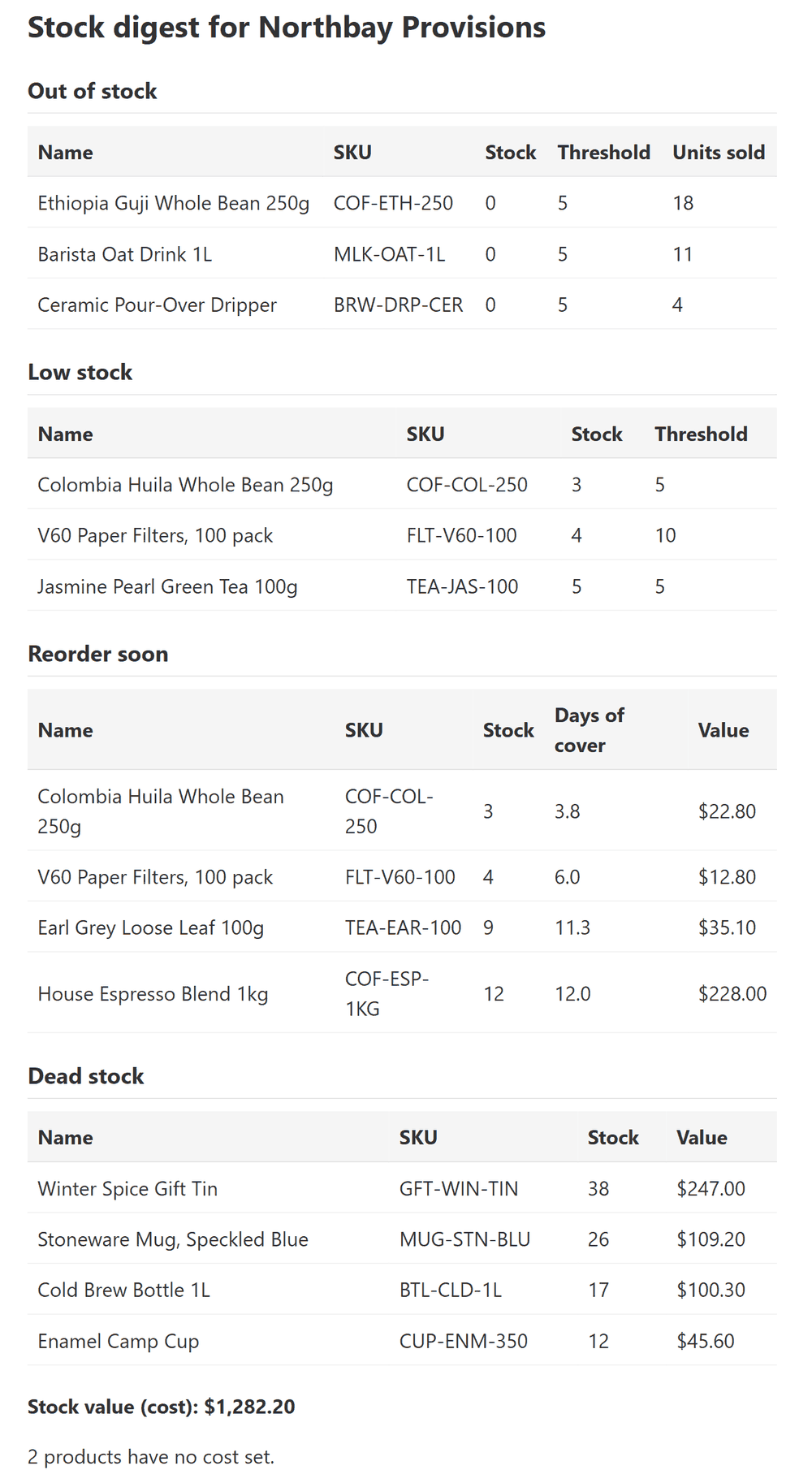
Tadrik Stock Digest sends one daily or weekly email: what is out of stock, running low, about to run out or not selling, and what your stock is worth.
Made for owners and stock managers of WooCommerce stores that keep track of their stock.
Free plugin. No account needed. The email goes out through your own site.
01 / The email
One email. Five answers.
WooCommerce sends one email per product when it hits its low-stock level, with no overview and no word about what isn't selling. This sends one email that covers the whole shop.
- Out of stock
- Products at zero or below, with how many sold in your sales window. Best sellers come first, so the costly gaps are at the top.
- Low stock
- Products at or below their low-stock level. Set one level for the store, or a different one on any product.
- Reorder soon
- Products that will run out within your cover window at the current sales pace, with the days left and the value on the shelf.
- Dead stock
- Products that still sit on your shelves and haven't sold for months, with what that stock is worth. New products are left out until they are old enough.
- Stock value
- The total value of the stock you track, at cost or at selling price. Products with no cost set are counted separately, so you can see what is missing.
02 / How it works
Set it up once. Then just read it.
Set it up
Open WooCommerce > Stock Digest. Enter who should get the email, daily or weekly, and the hour you want it.
Recipients → daily, 7:00Send a test
Press Send a test digest now to get the exact email straight away. The preview on the same page shows the same lists.
Send a test digest now → email in your inboxRead it
From then on it arrives on your schedule. By default it stays quiet on days when nothing needs attention.
Nothing to report → no email03 / What you can set
A few settings. Sensible starting values.
- Schedule
- Daily or weekly, at the hour you pick in your store's time. For weekly, you pick the day.
- Recipients
- Up to 10 email addresses. Leave it empty and the email goes to your site's admin address.
- The limits
- Low stock level (5 to start with), dead stock after 90 days, a 30-day sales window and a 14-day reorder cover. Change any of them.
- Value
- Count stock at cost or at selling price. Cost is read from WooCommerce's own cost field and from the popular cost-of-goods plugins.
- Which products
- Simple products and variations that have Manage stock turned on. The line for a variable product itself is skipped, because its variations hold the stock.
- Which sales
- Only completed and processing orders count towards the sales pace.
- Compatibility
- Works with HPOS (High-Performance Order Storage), WooCommerce's faster order storage.
- Your data
- The email is sent through your own site's email to the addresses you enter. The plugin sends no other data anywhere while you use it. When you deactivate it, it asks why; that answer goes to us only if you click Send & deactivate.
04 / Get it
Free. Install it like any plugin.
Version 1.0.1
Freeany number of sites
- All five lists in every email
- Daily or weekly, up to 10 recipients
- A preview and a test send on the settings page
- Limits you can change
Install
- In WordPress, go to Plugins > Add New and search for "Tadrik Stock Digest".
- Install and activate it.
- Open WooCommerce > Stock Digest and press Send a test digest now.
Needs WordPress 6.5+, WooCommerce 8.6+ and PHP 7.4+.
05 / Questions
Straight answers.
Which products are included?
Any simple product or variation that has Manage stock turned on. A variable product's own line is skipped, because its variations hold the stock.
How is "Reorder soon" worked out?
The plugin takes the units sold in your sales window and divides them by the number of days in it. That is the sales pace. Your stock divided by that pace is the days of cover. If the days of cover are fewer than your Reorder cover days setting, the product appears in Reorder soon.
What counts as "Dead stock"?
A product that has stock on the shelf, was added more than your Dead stock days ago, and hasn't sold in that time either. The Dead stock days setting is 90 to start with.
Where does the cost come from?
From WooCommerce's own cost of goods field, or from the cost field of the popular cost-of-goods plugins. If a product has no cost, it is counted under "products have no cost set" and left out of the total, so you can see what is missing. You can also count stock at selling price instead.
Can I send it to more than one person?
Yes. Enter up to 10 email addresses, one per line or separated by commas, semicolons or spaces. If the field is empty, the email goes to your site's admin address.
Set it up once, then just read the email.
Install the free plugin, add your email address and press Send a test digest now.
Georgios Kandilas, founder